Dolce Gusto Timer2.0.5
Publisher Description


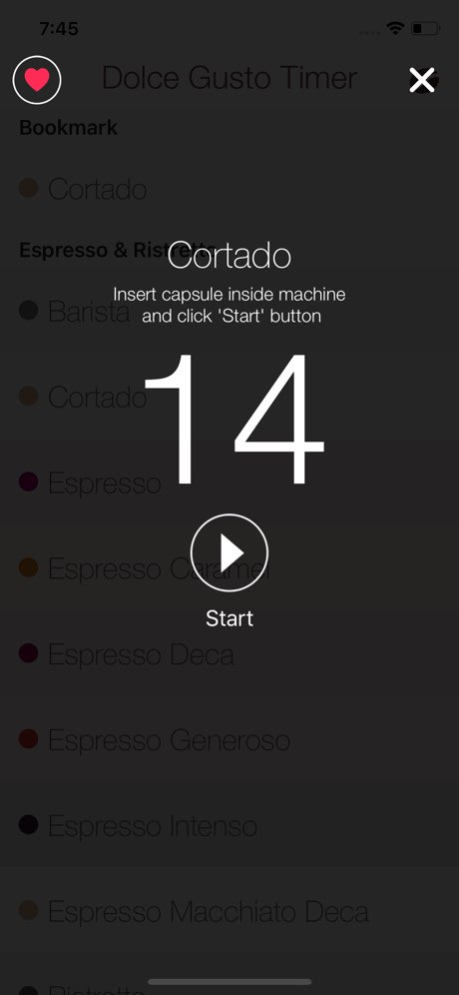
This is the only one application to make your Dolce Gusto drinks.
Dolce Gusto Timer help you to use your Dolce Gusto machine: it says you exact timing for your drinks.
It's easy: you just have to select your drink and here we go, our application notifies you when it's done.
The brand Dolce Gusto is owned by Produits Nestlé S.A., the application is not related to Produits Nestlé S.A. or any of its partners.
Version History + Double Espresso
+ Flat White
+ Latte Macchiato Guatemala Bio
+ Starbuck Toffe Nut Latte
Merry Christmas ! 2.0.5 12/23/2021 Hello Portuguese and Brazilians 2.0.4 12/17/2021 Fix pods translation 2.0.3 12/12/2021 Bug fix 2.0.2 12/01/2021 Fix a bug on the timer 2.0.1 11/30/2021 - Add last capsules released
- Improve timer 2.0 11/25/2021 iPhone X update. 1.3.0 01/10/2018 Now you know what es capsule to be inserted in the machine ( tea , chocolate, coffee or milk) ! 1.2.0 06/09/2016 Here we are ! Two new teas are added to the application.
I also added the bookmark icon to find more easily your favorite drinks ! 1.1.0 05/21/2016 Adding the Spanish language 1.0.1 08/22/2015 1.0.0 07/20/2015
About Dolce Gusto Timer
The company that develops Dolce Gusto Timer is Pierre Pettera. The latest version released by its developer is 2.0.5.
To install Dolce Gusto Timer on your iOS device, just click the green Continue To App button above to start the installation process. The app is listed on our website since 2026-10-14 and was downloaded 18 times. We have already checked if the download link is safe, however for your own protection we recommend that you scan the downloaded app with your antivirus. Your antivirus may detect the Dolce Gusto Timer as malware if the download link is broken.
How to install Dolce Gusto Timer on your iOS device:
- Click on the Continue To App button on our website. This will redirect you to the App Store.
- Once the Dolce Gusto Timer is shown in the iTunes listing of your iOS device, you can start its download and installation. Tap on the GET button to the right of the app to start downloading it.
- If you are not logged-in the iOS appstore app, you'll be prompted for your your Apple ID and/or password.
- After Dolce Gusto Timer is downloaded, you'll see an INSTALL button to the right. Tap on it to start the actual installation of the iOS app.
- Once installation is finished you can tap on the OPEN button to start it. Its icon will also be added to your device home screen.
Program Details
System requirements
Download information
Pricing
Version History
version 2.0.5
posted on 2026-10-14
Version History + Double Espresso
+ Flat White
+ Latte Macchiato Guatemala Bio
+ Starbuck Toffe Nut Latte
Merry Christmas ! 2.0.5 12/23/2021 Hello Portuguese and Brazilians 2.0.4 12/17/2021 Fix pods translation 2.0.3 12/12/2021 Bug fix 2.0.2 12/01/2021 Fix a bug on the timer 2.0.1 11/30/2021 - Add last capsules released
- Improve timer 2.0 11/25/2021 iPhone X update. 1.3.0 01/10/2018 Now you know what es capsule to be inserted in the machine ( tea , chocolate, coffee or milk) ! 1.2.0 06/09/2016 Here we are ! Two new teas are added to the application.
I also added the bookmark icon to find more easily your favorite drinks ! 1.1.0 05/21/2016 Adding the Spanish language 1.0.1 08/22/2015 1.0.0 07/20/2015
version 2.0.5
posted on 2026-09-04
Version History + Double Espresso
+ Flat White
+ Latte Macchiato Guatemala Bio
+ Starbuck Toffe Nut Latte
Merry Christmas ! 2.0.5 12/23/2021 Hello Portuguese and Brazilians 2.0.4 12/17/2021 Fix pods translation 2.0.3 12/12/2021 Bug fix 2.0.2 12/01/2021 Fix a bug on the timer 2.0.1 11/30/2021 - Add last capsules released
- Improve timer 2.0 11/25/2021 This app has been updated by Apple to prepare for watchOS 27 compatibility. No new features are included.
iPhone X update. 1.3.0 01/10/2018 Now you know what es capsule to be inserted in the machine ( tea , chocolate, coffee or milk) ! 1.2.0 06/09/2016 Here we are ! Two new teas are added to the application.
I also added the bookmark icon to find more easily your favorite drinks ! 1.1.0 05/21/2016 Adding the Spanish language 1.0.1 08/22/2015 1.0.0 07/20/2015
version 2.0.5
posted on 2026-08-23
Version History + Double Espresso
+ Flat White
+ Latte Macchiato Guatemala Bio
+ Starbuck Toffe Nut Latte
Merry Christmas ! 2.0.5 12/23/2021 Hello Portuguese and Brazilians 2.0.4 12/17/2021 Fix pods translation 2.0.3 12/12/2021 Bug fix 2.0.2 12/01/2021 Fix a bug on the timer 2.0.1 11/30/2021 - Add last capsules released
- Improve timer 2.0 11/25/2021 This update from Apple will improve the functionality of this app. No new features are included.
iPhone X update. 1.3.0 01/10/2018 Now you know what es capsule to be inserted in the machine ( tea , chocolate, coffee or milk) ! 1.2.0 06/09/2016 Here we are ! Two new teas are added to the application.
I also added the bookmark icon to find more easily your favorite drinks ! 1.1.0 05/21/2016 Adding the Spanish language 1.0.1 08/22/2015 1.0.0 07/20/2015
version 2.0.5
posted on 2021-12-23
Dec 23, 2021 Version 2.0.5
+ Double Espresso
+ Flat White
+ Latte Macchiato Guatemala Bio
+ Starbuck Toffe Nut Latte
Merry Christmas !
version 2.0.5
posted on 2021-12-23
+ Double Espresso
+ Flat White
+ Latte Macchiato Guatemala Bio
+ Starbuck Toffe Nut Latte
Merry Christmas !
